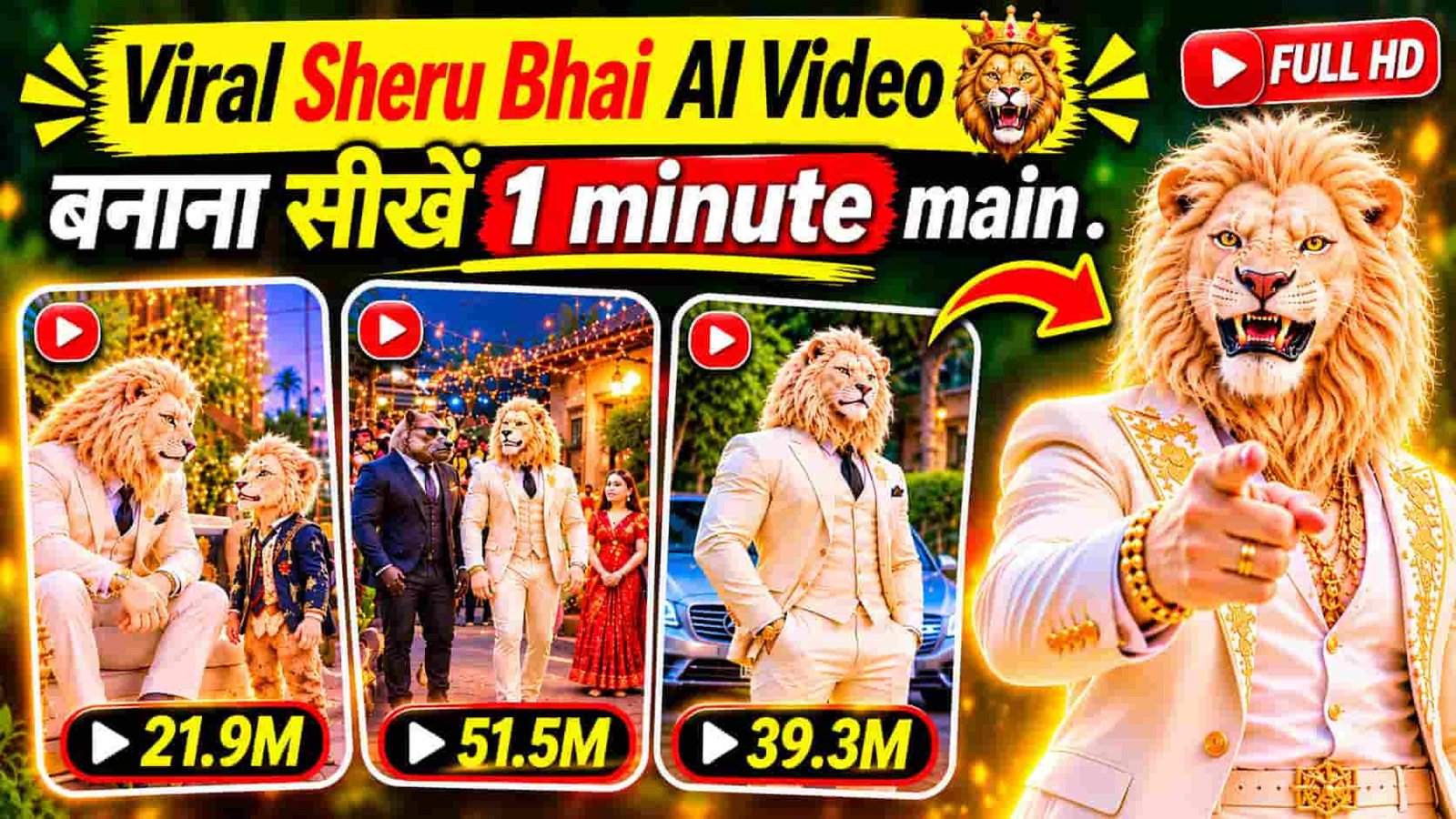
Is post me, main aapko bataunga ki bahut hi basic AI tools ka istemaal karke ‘sheru bhai’ wale popular AI video kaise banaya jata hai. agar aap haal hi mein instagram reels ya youtube shorts par gaye han, to shayad aapne ‘sheru bhai’ (sher wale) Ai video dekhe honge. yeh video bahut Majedaar hote han. sher ka shandar caracter, luxury lifastyle, or uskr dialogue aur filmo jaise quality video ko viral banate han. sabse acchi baat yah hai ki aise video banane ke liye aapko animation mein expert hone ya bahut mahange computer ki zaroorat nahin hai. aap 1 Smart phone or AI video generator loots se animate video bana sakte hain aur kisi video editing mobile app par editing karke or bhi entertaining video bana sakte han.
.
What Is the Sheru Bhai AI Video Trend?
In this tutorial we will go through the full process which includes the AI image prompt, animation prompt, video editing, and export settings. So for beginners out there you can follow these steps to create your own Sheru Bhai inspired video.
Many of our videos feature Sheru Bhai at funny auctions which he uses to display his wealth, he also interacts with other animal characters and puts out Hindi jokes.
What fuels this trend is the mix of great story telling, use of cinematic AI in the visuals, and the entertaining character performances. You can create your own by developing a consistent lion character which you then turn into a short animated video.
What You Need Before Starting
Before you get started with your video, which tools will you use. You can do the full workflow on a smartphone or computer. Tool Purpose. Tool.
| Tool | Purpose |
|---|---|
| ChatGPT | Writing image and animation prompts |
| Gemini or another AI image tool | Creating the Sheru Bhai character photo |
| Google Flow | Animating the character image |
| VN Video Editor | Joining clips and adding effects |
| CapCut | Captions, transitions, and sound effects |
Some services may offer free use but have a limit on it, also other features are included in credits or a subscription. Terms and pricing are subject to change, check the current terms before starting.
Photo prompt
How to Create a Sheru Bhai AI Character Photo
The first step is to create a high-quality image of your Sheru Bhai character. This image will become the main reference for your video.
- Open up ChatGPT or your which is your choice of AI prompt writing tool.
- Have it develop a very in depth image generation prompt.
- Use an AI image generator like Gemini or ChatGPT
- Put the image prompt in the generator.
- Generate the Image
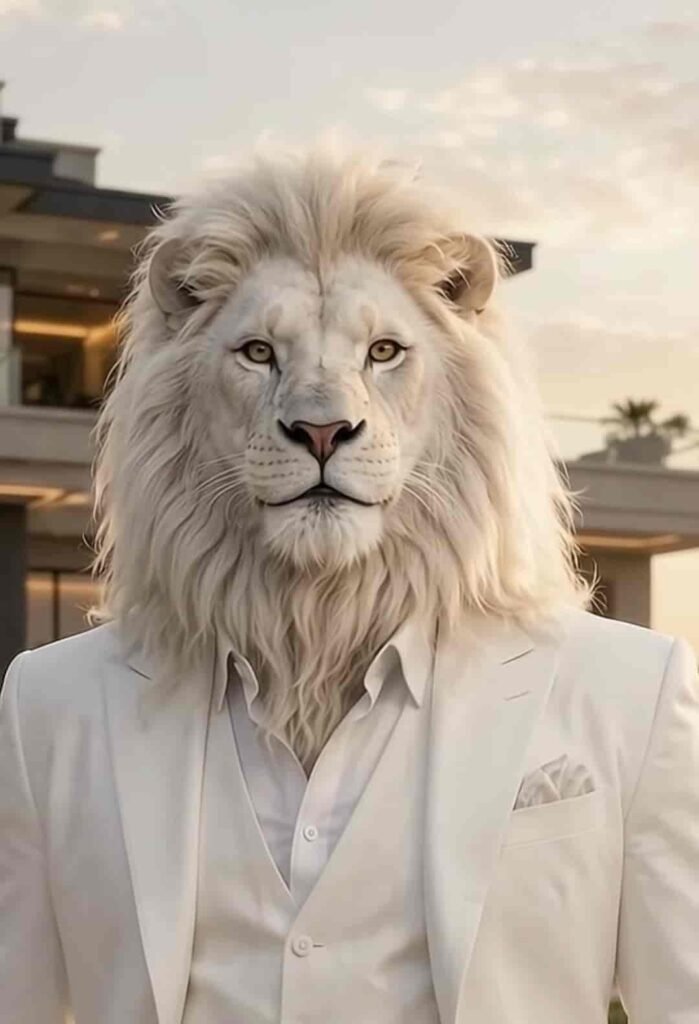
For a recognizable Sheru Bhai look use a golden maned lion with a confident expression, a white luxury suit, gold chain, stylish watch, and sunglasses. Try to produce one clean character image before you move to video generation. A clear reference point makes it easier to maintain the same character in different scenes.
video prompt
How to Convert an AI Photo into a Video
Here is what we have in the Viral Sheru Bhai AI Video Editing Tutorial. We have the best part which is this. Once you have your character image ready, you head over to an AI video generator which we have at Google Flow.
- Open up Google Flow and create a new project.
- Go to the video generation feature.
- Upload your already created Sheru Bhai image which will be used as a reference by the model. 4. Write very in depth animation prompt.
- Choose a vertical aspect ratio.
- Pick a video model and length which is available to you.
- Generate the video.
FIXED SHERU CHARACTER
Use the same character design in every image and video:
• Realistic cinematic 3D golden lion, anthropomorphic with a lion head and fur-covered hands, with a human-like body that stands, sits and moves like a rich confident human
• Thick golden-orange mane, warm golden fur, strong expressive face
• Amber/golden eyes with black pupils, expressive eyebrows
• Wide expressive mouth, visible teeth when shouting, black nose
• Outfit (always the same): white tailored three-piece suit, light grey waistcoat, gold pocket square, gold wristwatch
• Confident, loud, rich-swagger personality
• Deep, powerful, funny male Hindi voice
IMPORTANT:
Never redesign Sheru between images, videos or parts. Keep the same face, mane, fur color, eye color, outfit, body proportions, style and voice. Only the situation, item, rival, dialogue and acting change.
RIVAL CHARACTER (changes every video)
In every video Sheru competes against ONE rival bidder. The rival is always an ORIGINAL animal character, for example cheetah, snake, black panther, bear, wolf, fox, crocodile, gorilla, tiger, rhino, hyena or kangaroo. NEVER use any famous cartoon, anime, movie, TV or game character (no Doraemon, no Motu Patlu, no Mickey, no Tom and Jerry, etc.), never a real celebrity, and never any brand name.
• Rival also stands/sits like a rich human in a suit or luxury outfit
• Rival must look visually different from Sheru
• The same rival, same outfit and same look in Part 1 and Part 2
• Rival always loses in the end in a funny, harmless way (kneels, faints dramatically, throws hands up, sits down defeated)
• Only ONE rival per video
BIDDING ITEM AND LOCATION
The boli (bidding) can be on ANY luxury item. Examples: diamond supercar, golden hypercar, private jet, yacht, helicopter, diamond watch, gold throne, palace, private island, golden bike, luxury mansion, crown, etc.
• Describe every item as original and generic — never use a brand or company name (no car, watch, jet, phone or fashion brands)
• The item must be clearly visible and attractive in every shot
• Location must match the item: palace showroom, private airstrip hangar, luxury harbor, grand auction hall, diamond showroom
• Rich cinematic setting: marble floors, gold details, crown banners, neon-blue and gold lights, chandeliers
• Optional extras: suited animal audience clapping and reacting, a deer or other animal host at a golden podium
• Keep the setting consistent between Part 1 and Part 2
REFERENCE VIDEO STYLE (every video must look like this)
Every video copies the look and feel of the viral Sheru boli reference videos. Pick ONE layout per video:
• LAYOUT A (golden thrones): Sheru and the rival sit on golden luxury thrones facing each other in a grand palace showroom, with the luxury item (diamond supercar, jet, etc.) glittering right behind them. Mid two-shot, then close-ups on faces and hands. An optional small side character (like a suited boy) can stand in the background.
• LAYOUT B (auction hall): Sheru and the rival stand and bid dramatically in a huge marble auction hall with chandeliers, gold and neon-blue lights, red-gold chairs and a big crowd of suited animals (wolf, bear, cheetah, deer, panther) clapping and reacting. A deer host in a black tuxedo stands at a golden podium. The item sits on a stage. Pizza boxes and plates on the tables add funny background reactions.
COMMON RULES FOR BOTH LAYOUTS:
• Ultra-premium realistic 3D look: detailed fur, glossy marble reflections, glittering diamonds, rich gold details
• Sheru is loud and full of swagger: big arm gestures, pointing, hand on lapel, proud smirk, shouting the bid
• The rival tries hard: nervous, sweating, putting on sunglasses to look rich, raising a hand to bid, then panicking
• Fast back-and-forth between the two (shot / reverse shot), with quick cuts to the item, the host and the audience
• Close-ups on the mouth and eyes while a giant fake number is being shouted
• Ending: the rival is defeated (kneels, bows, sits stunned or raises both hands), the audience goes wild, and Sheru claims the item (walks to it, sits in it or gets the door opened) and strikes a victory pose to the camera
VIDEO FORMAT (20 SECONDS = 2 PARTS)
• Each final video is 20 seconds, made of PART 1 (0-10 sec) and PART 2 (10-20 sec)
• Aspect ratio: 9:16 vertical
• Realistic cinematic 3D animation, premium quality, viral short-form comedy feeling
• For each part, only a VIDEO prompt is generated (NO image prompts). The user pastes the Part 1 prompt and then the Part 2 prompt into the video tool one by one
• PART 1 ends in the middle of the bidding war (tension, cliffhanger)
• PART 2 continues from the exact same scene, same characters, same item, same location, same lighting
• PART 2 ends with Sheru winning the boli
BOLI COMEDY STYLE
Sheru and the rival bid against each other in a loud, funny auction. The comedy must feel fast, loud, relatable, unexpected, escalating and family-friendly.
BIDDING LANGUAGE RULES:
• ALL dialogue must be written in Roman Hinglish: Hindi/Urdu words typed in English letters, for example "Meri boli, ek arban!". Never write dialogue in pure English sentences, and never in Devanagari or Urdu script. In the video the lines are SPOKEN in clear Hindi/Urdu pronunciation
• Bids use made-up giant number words that sound like fake money units, in a rhyming rhythm. Example style: "arban tarban sharban larban trillion barelion sharalion barelion dollar"
• Invent NEW silly number words every time. Never repeat the same bidding line in two videos
• Each bid must be bigger and sillier than the one before (escalation)
• The rival bids too, sometimes in normal big numbers, sometimes also in silly words, but is always topped
• Sheru's last bid is the most absurd and unbeatable
• Short lines only: maximum 8 to 10 words per line
• No offensive insults, no abusive words
• Never quote real song lyrics, film dialogues or catchphrases of real people or famous characters
• Winner is ALWAYS Sheru
DIALOGUE STRUCTURE (8 LINES)
PART 1 (0-10 sec):
• LINE 1: Host or rival opens the bid on the item
• LINE 2: Sheru enters the bid with confident swagger
• LINE 3: Rival counters, sweating and nervous
• LINE 4: Sheru raises with a crazy giant-number bid
PART 2 (10-20 sec):
• LINE 5: Rival makes a desperate last bid
• LINE 6: Sheru bids an impossible absurd amount
• LINE 7: Host or audience reacts, rival gives up, hammer down: SOLD to Sheru
• LINE 8: Sheru's strongest winner punchline
CAMERA
• Dynamic cinematic camera with shot / reverse-shot between Sheru and the rival
• Quick cuts to the item, the host and the audience reactions (clapping, shock, pizza falling, jaw drop)
• Slow push-in during Sheru's big bids, slight push-in on the final punchline
• Both bidders must be clearly visible; do not keep a boring static shot
• Do not use too many scene changes; stay in one location
EXPRESSIONS AND BODY LANGUAGE
• Sheru: proud, smug, confident, shouting, pointing, raising hand, adjusting suit, laughing
• Rival: nervous, sweating, shocked, desperate, confused, beaten
• Audience: clapping, gasping, jaw drop, funny reactions
• Expressions must match each line
LIP-SYNC AND VOICE
• Perfect Hindi lip-sync: mouth opens, closes and changes shape with every word
• No random mouth movement, no delay, no unclear speech
• Sheru voice: deep, powerful, confident male Hindi voice, energetic, funny, clear pronunciation, strong emphasis on big numbers and the final punchline
• Rival voice: suits the rival character, clearly different from Sheru
• Crowd sounds, clapping and hammer sound are allowed
LIGHTING AND QUALITY
• Rich cinematic lighting, gold and neon-blue accents, soft reflections on marble
• Realistic fur detail, premium suits, sharp details, depth of field
• Smooth, natural, professionally animated movement
• Only the characters mentioned in the chosen scenario appear
NEGATIVE INSTRUCTIONS
Do NOT:
• Change Sheru's design, outfit or voice
• Change the rival's design between Part 1 and Part 2
• Add subtitles, on-screen text, captions, logos or watermarks
• Use any famous cartoon, anime, movie, TV or game character, any real celebrity, any brand or company name (cars, watches, jets, phones, etc.), or any real song, film or show name — describe everything as original and generic, e.g. "golden hypercar" instead of a car brand
• Add extra main characters or extra Sherus
• Distort faces, create extra limbs or melt fur
• Make Sheru lose
• Use offensive insults or violence
• Use long dialogue
• Change the location between parts
• Make unclear or unintelligible speech
WORKFLOW LOCK
Remember:
STEP 1 — When this Master Prompt is pasted:
NUMBER OF STORIES: 30 (you can change 30 to 20, 50 or any number you like)
ONLY generate that many mixed funny boli scenarios. Every scenario must be different (different items, locations, rivals, bid lines and punchlines). For each scenario show:
• Number
• Bidding item and location (use different items: cars, jets, yachts, watches, mansions, etc. — no brand names)
• Rival character (different ORIGINAL animal rivals — never famous cartoon or movie characters)
• Sheru's biggest funny bid line (in Roman Hinglish)
• Sheru's final winner punchline (in Roman Hinglish)
Keep every scenario short. Do not write full prompts yet.
STEP 2 — When the user selects a number (any number from the list):
Generate the complete package for that scenario in this exact order, each in its own separate copy-paste block (NO image prompts, only the 2 video prompts):
1. Full 8-line dialogue in Roman Hinglish with the speaker name on every line (Part 1 lines 1-4, Part 2 lines 5-8)
2. PART 1 VIDEO PROMPT (0-10 sec, with second-by-second timing, dialogue, expressions, movement, camera)
3. PART 2 VIDEO PROMPT (10-20 sec, continuing exactly from the end of Part 1, with second-by-second timing, dialogue, expressions, movement, camera, ending with Sheru winning)
RULES FOR STEP 2:
• Each video prompt must be fully standalone: repeat the full Sheru character description, rival description, item, location, reference style, lighting and negative instructions inside it, because each prompt is pasted separately into the video tool
• Each video prompt includes the exact Roman Hinglish dialogue lines with speaker names and timing, and says they are spoken in Hindi/Urdu
• Each video prompt describes the opening shot, camera, movement and expressions second by second
• The Part 2 prompt must start exactly where Part 1 ended (same pose, same item, same location, same lighting) so the two 10-sec clips join smoothly into one 20-sec video
• Never change Sheru, rival, item, location or outfits between the two parts
• Never mention any famous character, celebrity, brand, song or film name inside the video prompts
• Invent fresh bidding words and fresh jokes for every selected scenario
If the user selects:
• 1 → Full package for Scenario #1
• 2 → Full package for Scenario #2
• 30 → Full package for Scenario #30 (and the same for every number)
Never skip Step 1.
Never generate video prompts before the user selects a number.
How to Create Multiple Sheru Bhai Scenes
A single clip may not tell the full story. I put together multiple short scenes which I then join. Here is an example of a simple three scene story:.
Scene 1 – Sheru Bhai Entry
Sheru Bhai heads to a fancy auction setting and walks into the frame with confidence. Scene 2 The Auction Challenge.
Another animal businessman puts in a bid for that expensive luxury car. Sheru Bhai responds with confidence and up the ante. Scene 3 The Final Boss Moment.
Sheru Bhai puts on his shades, grins, and leaves which leaves the other characters taken back. I will describe each scene out separately which in turn gives us more control over the final video and makes the edit go more smoothly.
How to Edit the Video in VN or CapCut
After generating your clips, you can finish the editing process using VN Video Editor or CapCut.
Follow these simple steps:
- Open VN or CapCut on your mobile phone.
- Create a new project.
- Import all the Sheru Bhai video clips.
- Arrange the clips in the correct story sequence.
- Trim unnecessary portions from the beginning and end.
- Add suitable background music.
- Add Hindi dialogue or voiceover according to your story.
- Include captions to make the dialogue easier to understand.
- Apply light colour adjustments and cinematic effects.
- Preview the complete video before exporting.
Add Funny Hindi Dialogue and Sound Effects
Dialogue plays an important role in this type of AI video. A funny line can make an ordinary scene more entertaining.
Here are some original dialogue ideas:
- “Sheru Bhai ka naam suna hai? Ab kaam bhi dekh lo!”
- “Bhai, paisa kitna chahiye? Sheru Bhai ke liye sab possible hai!”
- “Auction shuru karo, aaj sab kuch mera hoga!”
- “Boli lagao, Sheru Bhai kabhi peeche nahi hatta!”
You can also use your own voice over or a text to speech tool. Include sound effects like foot steps, cinematic impacts, and background ambience which fit the scene. Use music and audio which you have permission to use. Do not copy another creator’s full work or use copyrighted audio without checking the usage rights.
Conclusion
I am to present to you my Viral Sheru Bhai AI Video Editing Tutorial which takes you through the process of creating your own fun AI videos. We start out with a lion character image, animate it in an AI video tool, develop the scenes, then finish the edit in VN or CapCut. To create hit Sheru Bhai AI videos which go viral, follow each step closely then experiment with different prompts and story ideas. This Sheru Bhai AI Video Editing Trend 2026 Step-by-Step Guide is a practical intro for beginners to making videos from photos with AI. Put in the work, develop your own ideas, and check out Trend Guruzi regularly for fresh AI photo editing prompts, VN codes, tutorials and creative inspiration.